My mom was stressed. Senior day for the Harvard men's tennis team is in May, and as the only US-based parent of a graduating senior (the rest of the team is international), the senior day planning fell to her. So as she was stressing about the to-do list, I decided to build something to help her out. It was a double win: I get to feel productive over vacation and help my mom.
The obvious solution
Open iMovie, drag in the photos, pick a song, and export. For a regular album, that's probably the fastest way to do it. But for an album with 200+ photos and videos, the manual sequencing and adjusting in a timeline editor sounds pretty tedious to me.
What I actually built
A Python pipeline where you drop your photos and music into a folder, run the scripts, and get a video out the other end.
The reason it's three scripts instead of one comes down to my mom's one request: she needed to be able to see the photos and reorder them without having to interact with any code. My mom finds the terminal very intimidating, like "I'm doing something bad, like hacking". So the goal was to give her a little taste of it (running the scripts) and then send her to a familiar app-like experience. So for the pipeline, the stages are kept separate. Scan all the images first, arrange them in a UI second, and render last, which is what makes it something she can actually use without touching any code.
For the video assembly I used MoviePy instead of calling ffmpeg directly, because raw ffmpeg means writing long shell commands and communicating in timecodes, which is tedious and would be pretty intimidating for a first-time user. MoviePy wraps all of that in Python objects, so each photo is just something you apply effects to and concatenate. I kept the effects simple and classic: Ken Burns zoom, crossfades, title overlays. Since it's all just Python, Claude Code could write and iterate on it without any friction or context switching.
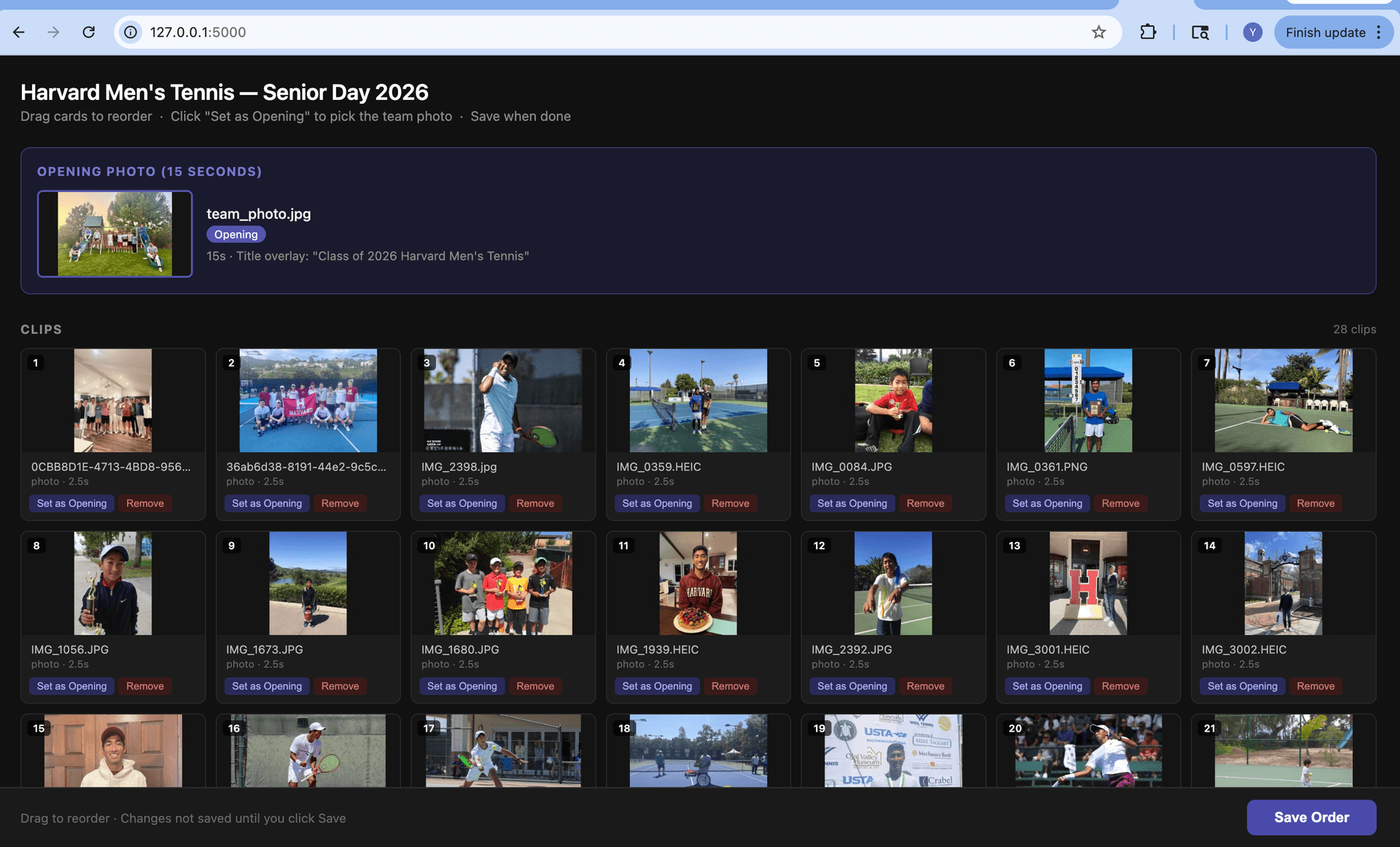
For the reordering UI I used Flask, because my mom needed a real interface and not a JSON file to hand-edit. Flask gives you a locally hosted web page in roughly fifteen lines of code, and the UI itself is a drag-and-drop thumbnail grid. She opens a browser tab, sees all the photos, drags them into whatever order she wants, sets the cover photo, and removes anything she doesn't like. Every change writes back to a state file immediately, so nothing gets lost if she closes the tab.
The outcome
The brainstorming and planning took about 15 minutes, building a working pipeline took another 15, and generating the video took about 2 minutes. Given that I am a beginner in iMovie who doesn't know any of the shortcuts or features, I'm pretty confident that at a scale of 200+ photos and videos this pipeline will end up being faster than me tinkering around in a timeline editor. And this version can be reused the next time someone needs a tribute video.
The real win here isn't the video or the (minimal) time save. It's that I got to show my mom what Claude Code is, what it can do, and how she can use it.
She sat with me while I built this, asked good questions, and by the end was genuinely excited about what else it could do. Seeing that drag-and-drop UI come together, something so technical made so simple, was the moment it clicked for her. She finished the session not just with a video pipeline, but with the confidence that she could build tools like this herself. She runs her own business, and that realization that she can automate the tedious parts of managing it is a pretty big deal.
Senior day is in May and the video doesn't have all the pictures in it yet, but the scripts work and my mom has the instructions. She's going to get to run the code herself to finish my brother's senior day video, and I think that's going to feel pretty great for her.